VMware Cloudification Solutions
Helping vSphere virtualization customers move both new and old environment to cloud and realize the value increase brought by cloud with better cost performance and faster speed.
Challenge of VMware
After the IT administrator configures and deploys resources through vCenter and distributes it to users, there is a lack of effective traceability and recovery mechanism, which is easy to cause resources to be idle and wasted. vCenter is a tool for virtualized resource mgmt. for IT administrators and cannot be opened for immediate use by end users. As business needs grow, IT administrators face a lot of configuration work and repeating labor.
Business scenarios are complex and diverse. End users need not only virtualized resources, but also IT teams to respond in time to other problems, so as to conduct effective business interactions and improve the speed of problem solving.
Build IT Service and Operation Center, Providing Enterprises Using vCenter with Effective IT Resources Governance
Self-service portal
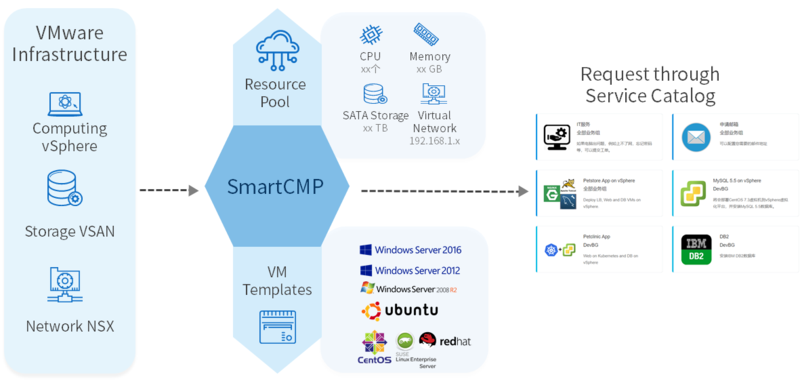
Based on the standard TOSCA application service orchestration capability, VMware administrators can publish virtualized resources such as simple virtual machines and complex multi-node applications required by users in the form of services. Users log in to the portal to request self-service and the platform automatically selects the appropriate resources for automated deployment based on policy, which greatly improves the efficiency of IT personnel and the speed of resource delivery.
Virtualized resource lifecycle mgmt.
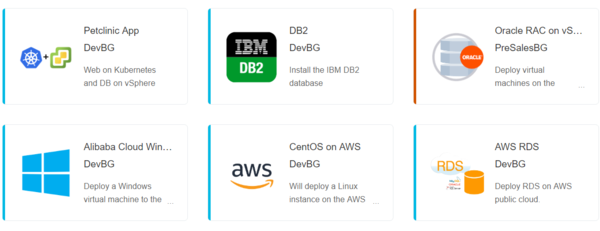
With SmartCMP, users can not only complete self-service request, cloud resource deployment and delivery, but also perform operations, view performance monitoring information, and set alerts. At the same time, SmartCMP automatically recycles resources based on the policy configured by the administrator to implement lifecycle management and avoid idle and waste.

IT service management
In addition to the vSphere virtualization resource request service, IT administrators can use SmartCMP to publish other services that require IT support, such as tickets, account requests, etc., for different business scenarios and requirements. Users apply and track through a unified service catalog which forms a complete IT service system and improves user satisfaction.

Billing and cost analysis
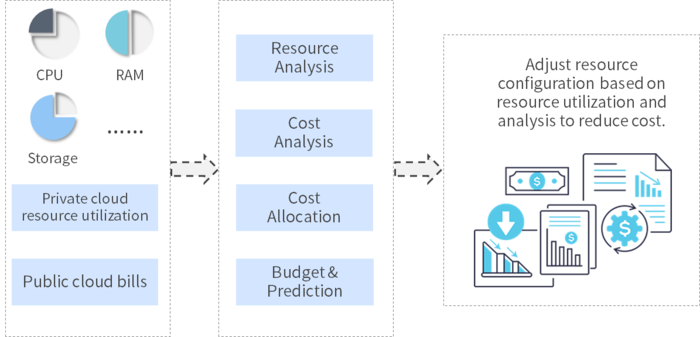
SmartCMP can set billing rules for VMware virtualized resources, quantify the cost of resource usage, and analyze it according to different departments, projects, individuals, etc., and show cloud cost scale and consumption structure from different perspectives to help IT management effectively manage VMware assets.
Unified management of multi-cloud
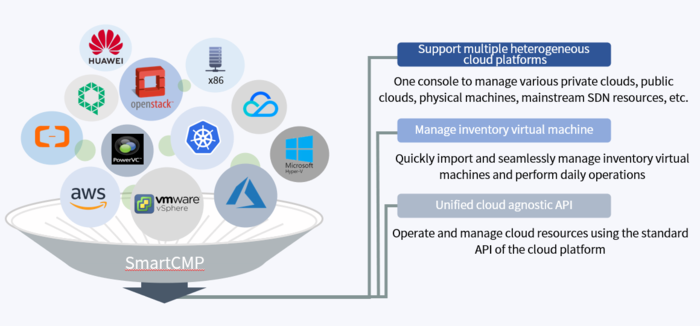
Based on VMware virtualization management, SmartCMP can manage other cloud platform resources in the data center, including private cloud, public cloud, container, and x86 physical machine, forming a unified control of multi- and hybrid cloud.
More solutions
Rich solutions to meet your business needs